🎉 New Feature: In-App Banner – Boost Product Adoption Instantly!
You can now display smart, customizable banners inside your customers sub-accounts to guide users who haven’t fully explored your features.
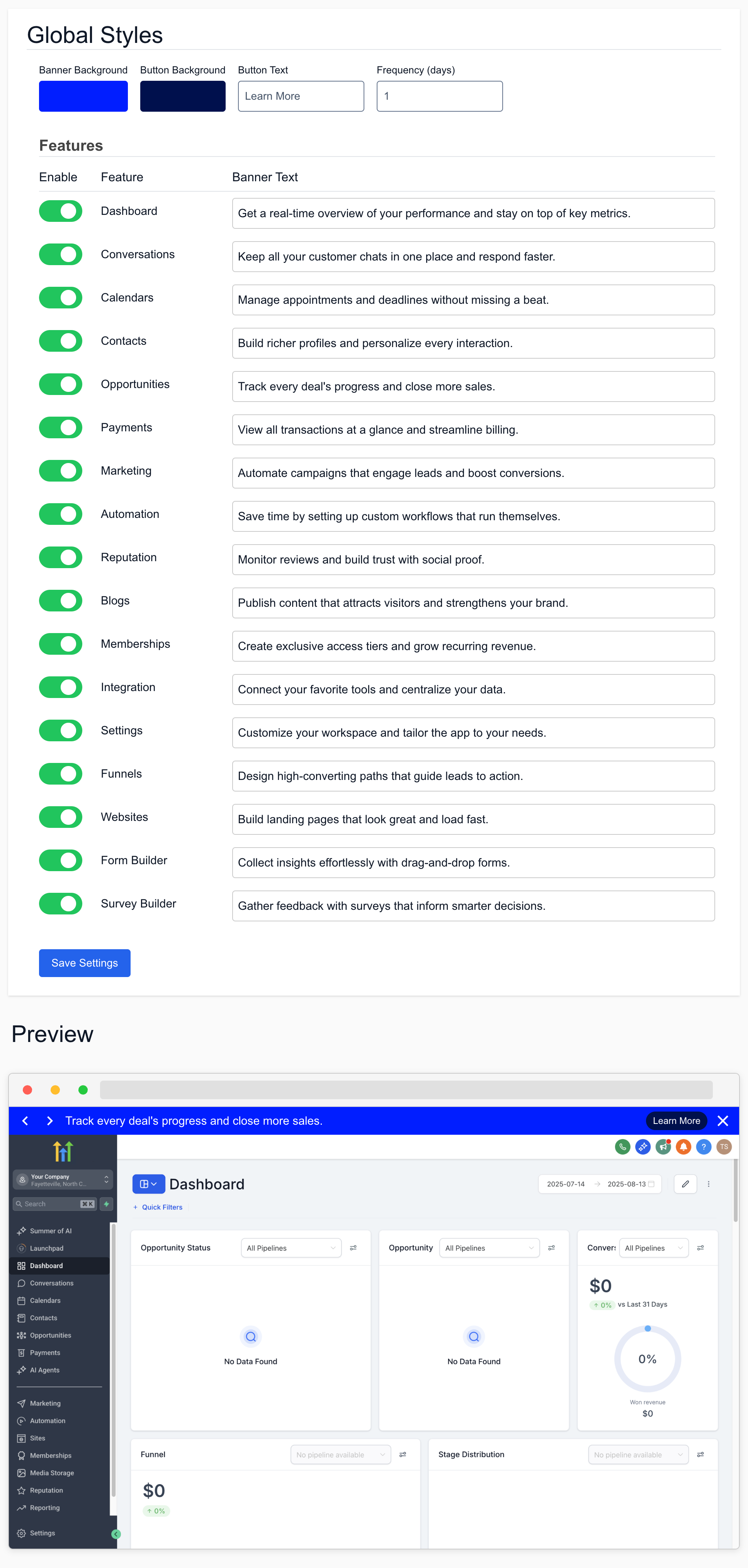
🧠 How It Works
These in-app banners will only appear to users who’ve spent less than 7 minutes on a given feature — ensuring only low-engagement users get nudged without bothering experienced ones.
🛠️ Customize It Your Way
🎨 Banner Background Color
🔵 Button Background Color
📝 Button Text (e.g., Learn More, Try It Now)
🔁 Frequency (days) – how often the banner shows
📣 Banner Message Text – unique for each feature
✅ Enable banners for multiple features at once
💡 Where to Enable
Go to Product Adoption > In-App Banner in your GoCSM to start.
You’ll see:
A global style editor for colors and frequency
A feature toggle list to enable banners on Dashboard, Calendars, Contacts, and more
A preview simulator to see exactly how your banners will look
✅ Benefits
Increase onboarding & activation for new users
Improve product adoption without spamming
Fully brandable for a white-labeled experience
Check it out! Available now in your GoCSM → Product Adoption > In-App Banner.